
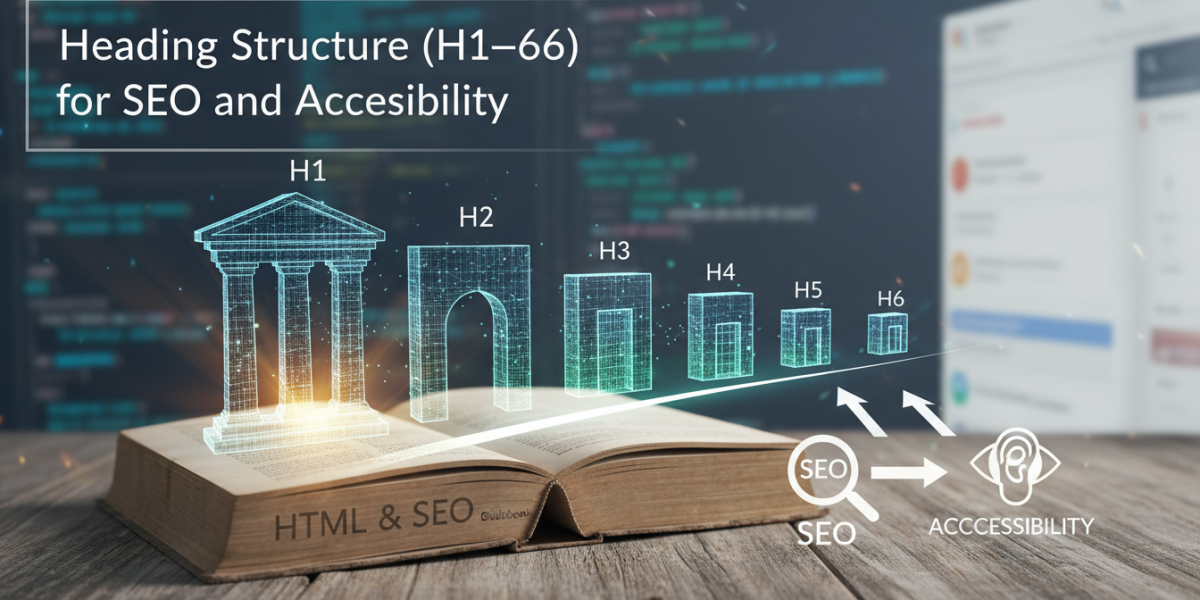
If you’ve ever landed on a webpage that felt impossible to navigate — walls of text, no clear sections, no visual hierarchy — you’ve experienced firsthand what poor heading structure does to readers. Heading structure, spanning H1 through H6, is one of those foundational elements of web design and content strategy that quietly does enormous work. It shapes how search engines interpret your content, how screen readers guide visually impaired users through a page, and how everyday visitors decide whether to stay or click away. Getting it right isn’t complicated, but it does require intention.
What Is Heading Structure and Why Does It Matter for SEO?
Headings in HTML are defined using tags from <h1> to <h6>, with H1 being the most important and H6 the least. Think of them like the chapters and subchapters of a book. Without them, everything blurs together.
From an SEO perspective, search engines like Google use heading tags to understand the hierarchy and topic coverage of a page. When Googlebot crawls your content, it pays attention to what’s inside those tags — not just the words themselves, but how ideas are organised and related to each other.
This doesn’t mean stuffing keywords into every heading. It means using headings to signal structure clearly, so both machines and humans can follow the logic of your content without guessing.
The H1: Your Page’s Main Statement
Every page should have exactly one H1 tag. This is your headline — the primary statement of what the page is about. On a blog post, it’s usually the article title. On a product page, it’s typically the product name or a compelling descriptor.
Google has confirmed that multiple H1s won’t automatically hurt your rankings, but using only one creates clarity. It tells both crawlers and readers: this is the central idea here. Think of it less as a rule and more as good communication.
H2 to H6: Building the Hierarchy
H2 tags introduce your main sections. H3s break those sections into subsections. H4 through H6 are available for deeper layers — though in practice, most content rarely needs to go beyond H3 or H4.
The key is logical nesting. An H3 should always sit under an H2, never jump directly after an H1. Breaking this hierarchy confuses both assistive technologies and search crawlers. It’s like starting a book chapter in the middle of a sentence from the previous one.
Heading Structure and Accessibility: More Than a Nice-to-Have
Accessibility is where heading structure arguably matters most. For people using screen readers — software used by blind or low-vision users — headings aren’t just visual dividers. They’re navigation tools.
Screen readers like JAWS or NVDA allow users to jump between headings with a single keystroke. If your headings are inconsistent, missing, or purely decorative (styled text that looks like a heading but isn’t coded as one), these users can’t efficiently navigate your content. They’re left wading through every word to find what they need.
According to WebAIM’s Screen Reader User Survey, navigating by headings is the most commonly used method for finding information on a webpage. That’s not a minor statistic — it reflects how central headings are to the actual experience of millions of people online.
WCAG Guidelines and What They Require
The Web Content Accessibility Guidelines (WCAG), developed by the W3C, provide the international benchmark for digital accessibility. Under WCAG 2.1, Success Criterion 1.3.1 (Info and Relationships) requires that information conveyed through structure be available programmatically — which includes proper use of heading tags.
Many organisations are legally required to meet WCAG standards. In the EU, the European Accessibility Act (EAA) comes into full effect in June 2025, requiring most businesses to make digital services accessible. In Ireland and across the EU, this means web content must meet at minimum WCAG 2.1 Level AA. Proper heading structure is a core part of compliance, not an optional extra.
Real-World Scenario: What Goes Wrong Without Headings
Imagine an online retailer with a long product description page. The page has bold text, coloured fonts, and visual separators — but no actual heading tags. It looks structured to a sighted user. But a screen reader announces only "link, link, text, text" with no way to skip to the specifications section or the delivery information.
That’s a broken experience. And it’s more common than most developers and content teams realise.
How to Structure Headings Correctly: A Step-by-Step Approach
Getting heading structure right from the start is much easier than retrofitting it later. Here’s a practical process worth following.
Start with your H1. Before writing a word, define what this page is fundamentally about. That becomes your H1. Keep it descriptive and specific — not "Welcome to Our Site" but "Commercial Cleaning Services in Dublin."
Map out your H2s. These are your main topics. For a service page, that might be: What We Offer, How It Works, Who We Work With, Pricing, and FAQs. Write these out before you write the content — it acts as your outline.
Use H3s to go deeper. Within each H2 section, do you need to break it into subtopics? A "How It Works" section might have H3s for Step 1, Step 2, and Step 3. An H3 under "What We Offer" might distinguish between different service types.
Don’t use headings just for style. If you want large, bold text for visual effect, use CSS. Heading tags should only appear when they genuinely mark a structural section of content. Misusing them for aesthetics breaks both SEO and accessibility.
Review the hierarchy before publishing. Many content management systems, including WordPress, have plugins like Yoast SEO or Rank Math that visualise your heading hierarchy. Tools like WAVE (from WebAIM) will flag heading errors from an accessibility standpoint.
Common Mistakes That Undermine Your Heading Structure for SEO
Even experienced content teams slip into patterns that weaken their heading strategy. These are the ones worth watching for.
Skipping heading levels. Jumping from H2 to H4 creates gaps in the hierarchy. Screen readers announce the heading level, so a user hears "Heading Level 4" after a "Heading Level 2" and wonders what they missed.
Using the same keyword in every heading. This is a vestige of old-school SEO thinking. Repeating the exact same phrase in five headings doesn’t strengthen your ranking — it signals poor content quality and reads awkwardly to humans.
Treating headings as decoration. A heading styled with a coloured background or icon should still be a real heading tag if it introduces a section. The visual treatment and the HTML tag need to match.
Forgetting mobile users. Headings on mobile need to be clear and concise. Long H2s that wrap across three lines on a small screen can disrupt readability. Keep them punchy.
How Heading Structure Supports SEO Beyond Keywords
It’s tempting to focus on headings purely as keyword placement opportunities, but their SEO role is more nuanced than that.
Google’s systems — including the passage indexing feature introduced in 2021 — can identify and rank individual sections of a page. Good heading structure essentially helps Google understand where each "passage" begins and ends. A well-structured page gives individual sections a better chance of ranking for specific queries, even if the whole page doesn’t rank for a broader term.
Featured snippets are another area where headings matter. When Google pulls a paragraph or list into a featured snippet, it often uses the heading directly above that content to understand the topic context. A clear H2 or H3 framing a well-written answer is one of the signals that increases snippet eligibility.
Internal content navigation is also worth mentioning. Long-form pages with a table of contents (auto-generated from heading tags) keep users on page longer and help them find specific sections faster. Lower bounce rates and higher engagement time are indirect SEO signals — not definitive ranking factors, but connected to overall page quality.
Frequently Asked Questions
What is the difference between an H1 and an H2 tag?
An H1 is the top-level heading — there should be only one per page, and it identifies the page’s core subject. H2 tags introduce the main sections within that page, similar to chapter titles within a book. Every H2 sits below the H1 in terms of hierarchy and importance.
How do I know if my heading structure is hurting my SEO?
Start by running your page through a free tool like Screaming Frog (for crawling) or Google Search Console (for indexing issues). Tools like WAVE or the Accessibility Insights browser extension will show heading order visually, making gaps or skipped levels immediately obvious. If your H1 is missing or you have multiple H1s, that’s worth fixing first.
Is it true that Google ignores heading tags now?
No. Google representatives, including John Mueller, have confirmed that heading tags remain a useful signal for understanding page structure and content relevance. They’re not the dominant ranking factor they once were, but dismissing them entirely would be a mistake — especially given their critical role in accessibility.
Does every page need all six heading levels?
Absolutely not. Most pages only need H1 through H3. The deeper levels (H4–H6) exist for complex content — technical documentation, legal texts, or academic-style long-form content with many nested subsections. Using all six on a typical blog post or service page would likely overcomplicate things.
Can I fix heading structure on an existing site without rebuilding everything?
Yes, and often it’s simpler than it sounds. In most CMS platforms, headings can be changed directly in the editor without touching the page design. Start with your highest-traffic pages, fix the H1s first, then work through the H2 and H3 hierarchy. A systematic audit over a few weeks can meaningfully improve both SEO and accessibility without a full redesign.
Conclusion
Heading structure is one of those topics that sits at the intersection of several disciplines — SEO, accessibility, content strategy, and UX — which is exactly why it’s easy to overlook. It doesn’t have the drama of a site speed problem or the novelty of a new algorithm update. But its impact is real, consistent, and cumulative.
Done well, a clear H1-through-H6 structure helps search engines index your content more accurately, helps screen reader users navigate efficiently, and helps every visitor quickly understand what you’re offering and where to find it. Done poorly, it silently undermines all three. The good news is that the principles are straightforward, the tools to audit it are largely free, and the fixes are usually well within reach.
Want help auditing or improving the heading structure on your website? Whether you’re starting from scratch or working with an existing site, our team is happy to walk you through what’s working and what could be stronger. Reach out at moc.ssobebolg@ofni or call us on +353 1 868 2345 — we’re always glad to have a conversation about what the right approach looks like for your specific situation.
Related Posts
 Image Alt Attribute Optimization | Dublin SEO Accessibility
 Service Page Copywriting: Structure, Length and Keywords
 A Practical SEO and Accessibility Check for Any Live Page
 Why Site Architecture Matters More Than Keywords for E-Commerce
 Should categories be included in the sitemap
 Navigate Our SEO Services with Our Detailed Sitemap
 The easiest way to make your website accessible to all with accessible
 A complete guide to site taxonomy for SEO